Global illumination
Brakeza3D includes a default light in the scene, which can be thought of as the sun.
Essentially, it is a directional light, so you can adjust some of its parameters to achieve the desired base illumination. Being a global light, it has no position. You can manipulate the components of global illumination through the UI or using your LUA scripts.
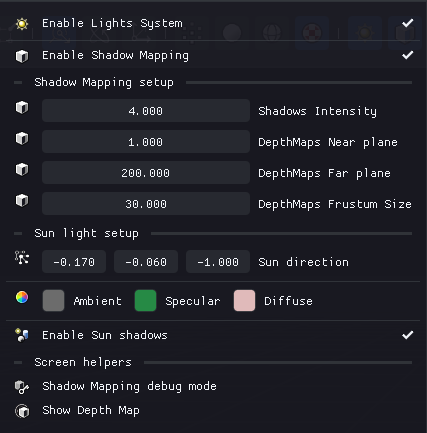
ADS Lighting Model
The ADS (Ambient, Diffuse, Specular) model is a standard lighting technique used in computer graphics to simulate how light interacts with objects in a 3D scene:
| Component | Description |
|---|---|
| Ambient | Base light that affects all surfaces equally, simulating indirect light |
| Diffuse | Direct light reflection based on surface angle, creates shading |
| Specular | Bright highlights on shiny surfaces, simulates reflections |
This separation allows realistic control of ambient light, direct light reflection, and surface highlights in a simple and efficient way.
Light Types
In Brakeza3D, you will find three types of lights:
| Light Type | Description | Position | Shadows | Typical Uses |
|---|---|---|---|---|
| Global Light | Simulates sunlight and global illumination | No | Yes | Outdoor scenes, daylight |
| Point Light | Emits light in all directions from one point | Yes | No | Bulbs, candles, small sources |
| Spotlight | Emits light in a specific direction with cone | Yes | Yes | Flashlights, stage lights |
All lighting properties can be edited through the GUI, with immediate visual feedback. This enables quick iteration on scene mood and atmosphere.
Shadow Mapping
Brakeza3D provides shadow mapping support for both global directional lights and spotlights, allowing you to add realistic dynamic shadows to your scenes.
This technique works by rendering the scene from the light's point of view to generate a depth map, which is then used to determine which areas should be in shadow during the final render pass.
- Global illumination: Produces large-scale, consistent shadow casting across the entire scene
- Spotlights: Enables focused, directional shadows ideal for lamps or flashlights
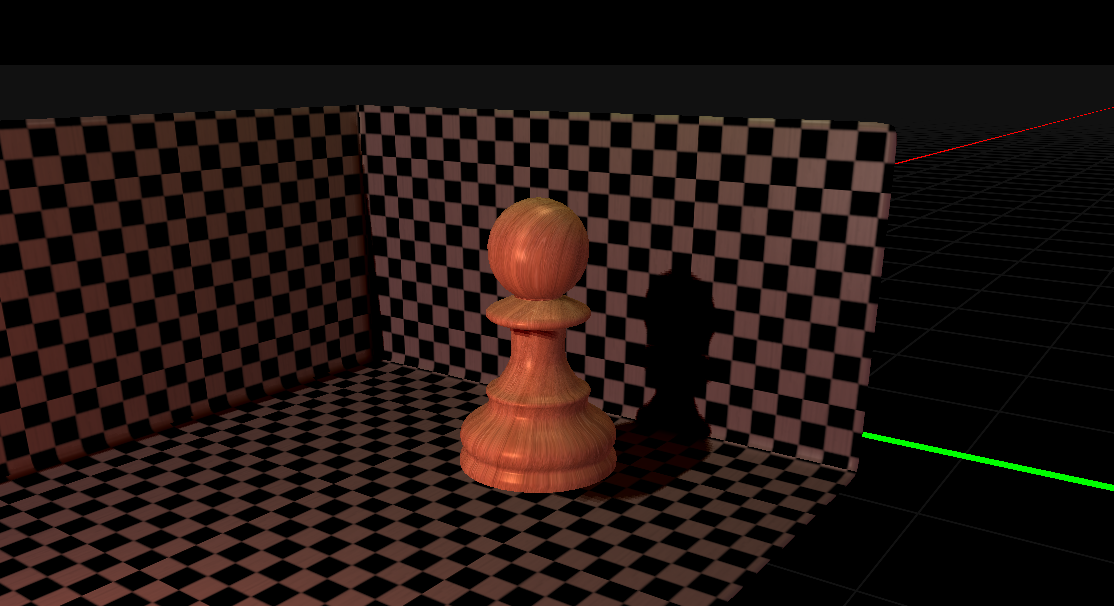
Currently, point lights do not support shadow mapping, as their omnidirectional nature requires a more expensive rendering approach. This ensures optimal performance while maintaining visual quality where shadows are most impactful.
Scripting API
For controlling lights programmatically via LUA scripts, see the Lighting System API reference, which includes:
- Global illumination methods (
setGlobalIlluminationAmbient,setGlobalIlluminationDiffuse, etc.) - LightPoint creation and configuration
- LightSpot creation and configuration